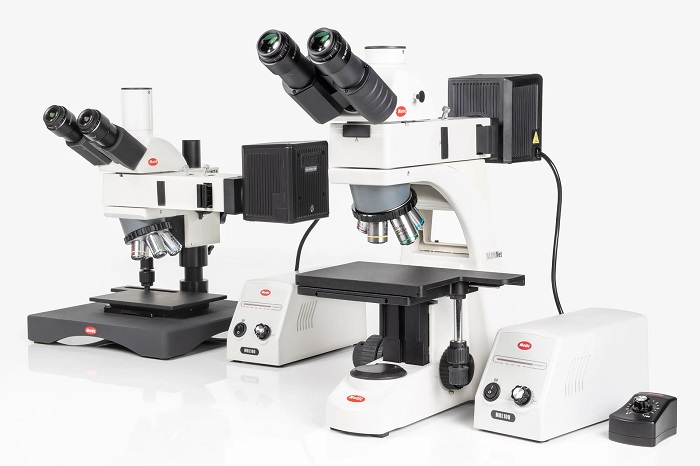
Previously, scientists were required to draw their microscopic observations on paper. This sounded quite hectic and burdening. However, with the help of a microscope camera, things have changed a lot.
A Wifi microscope camera becomes useful in so many ways that research and observation parts become easier for scientists and researchers. With an in-built camera, it streams a live close up view of everything you observe in a specimen.
In this article, let’s have a look into what makes a WiFi microscope cameras truly useful and what you need to look for while getting one for research purposes.
What Makes a Microscope Camera “Wi-Fi”?
Building a Wireless Link Between the Microscope and Your Screen
The microscope does two jobs: magnifying and acting like a small camera. The WiFi part is the way the camera works with your device. In reality, it looks like this:
- Turn the Microscope On.
- Connect your phone to the microscope’s WiFi or your home network.
- Open an app.
- You see a live view and are able to click pictures or shoot videos.
You’ll See Two Connection Setups All the Time
Most models use one of the approaches mentioned below:
- Direct Connect: Also called the Hotspot Mode, this mode helps the microscope broadcast its own WiFi signals. You just need to connect your phone straightaway to it. This is the most common and the easiest way.
- Network Connect(Router Mode): The microscope connects with your home WiFi and your phone connects with it like normal. This is more common in classroom style setups, which is also called “leave it on a station” use.
The Real Reason Labs Are Moving Away from Wired Setups
Wired microscope cameras have been the standard for a long time. And honestly, they’ve done the job well enough. But there’s a point where the limitations start to outweigh the benefits, especially in a busy lab or school research setting where time and collaboration both matter.
Cables Create More Problems Than You’d Expect
A tangle of USB cables, adapter dongles, and driver software doesn’t sound like a big deal until it’s the middle of a session and something stops working. Wired setups tie equipment to specific computers, limit where the microscope can be placed, and create a chain of dependencies that breaks at the worst times. So the setup that seemed simple at the start becomes a headache fast.
One Device Means One Viewer at a Time
That’s the actual bottleneck. With a wired camera feeding into a single workstation, only one person can really interact with the image. Everyone else waits or crowds around one screen. In a research team setting, that slows things down considerably.
Manually Sharing Images Costs More Time Than It Should
Saving a file, transferring it, and opening it somewhere else all take more time than they should. That friction interrupts the workflow in ways that are easy to underestimate. A WiFi microscope camera skips all of that by sharing the image the moment it’s captured.
How School Research Teams Use WiFi Microscope Cameras in the Classroom
A typical microscope lab period involves a lot of waiting. Students take turns, the teacher circulates, and by the time everyone’s seen the sample, half the class time is already gone. In practice, a WiFi microscope camera changes that dynamic in a pretty straightforward way.
The Whole Class Sees the Same Image at Once
When the camera’s live feed goes to a projector or classroom screen, every student is looking at the same thing at the same time. The teacher can point things out, students can ask questions in context, and the lesson actually moves forward. That kind of shared visibility makes a real difference in how well the material sticks.
Lab Reports Get Easier to Put Together
Students can capture images directly from the microscope and save them to their own device without any extra steps. Those images go straight into their lab reports or presentations. So instead of sketching what they saw through an eyepiece, they’re working with the actual image.
Students Who Struggle with the Eyepiece Still Participate Fully
Not every student finds a microscope eyepiece easy to use. Some find it uncomfortable, others struggle to focus correctly. Still, since the WiFi microscope camera puts the image on a screen, those students can engage fully without any added difficulty.
Features That Separate a Good WiFi Microscope Camera from a Mediocre One
Not every WiFi microscope camera delivers the same results under real working conditions. Still, a few things tend to separate the reliable options from the ones that fall short:
- Image resolution and sensor quality: Higher megapixels are useful, but sensor quality is what truly determines how clear and detailed the image stays when zoomed in on fine specimen details.
- Wireless range and signal stability: A camera that loses connection mid-session isn’t practical for lab use. Models with their own local hotspot instead of relying on building WiFi handle this considerably better.
- Cross-device compatibility: It should connect to phones, tablets, and laptops without extra software installations or a complicated setup process.
The Bottom Line on WiFi Microscope Cameras
A WiFi microscope camera isn’t a complicated upgrade. It solves a straightforward problem that most labs and classrooms deal with daily: too many people sharing one lens, and not enough time to go around.
For research teams and teachers, the value shows up quickly. Faster image sharing, better collaboration, and fewer workflow interruptions make a real difference in how smoothly sessions run.
The technology isn’t new. But the way it fits into real working environments makes it worth taking seriously.